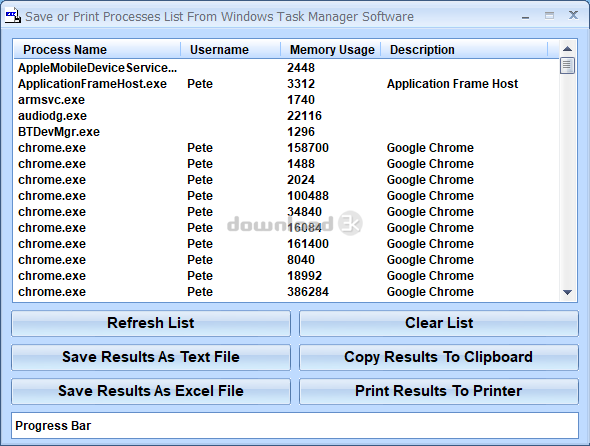


Save or Print Processes List From Windows Task Manager Software 7.0 NOD32 log
-
Avast:
Sauber -
Avira:
Sauber -
Kaspersky:
Sauber -
McAfee:
Sauber -
NOD32:
Sauber

Detalierte Berichte
ECLS Command-line scanner, version 13.0.24.0, (C) 1992-2019 ESET, spol. s r.o.
Module loader, version 1018.1 (20190709), build 1054
Module perseus, version 1559.1 (20200123), build 2102
Module scanner, version 20755 (20200129), build 44273
Module archiver, version 1297 (20200116), build 1413
Module advheur, version 1197 (20200116), build 1183
Module cleaner, version 1207 (20200128), build 1317
Module augur, version 1048 (20200122), build 1049
Command line: /log-rewrite /log-all /files /no-boots /no-heur /no-adv-heur /mail /sfx /rtp /adware /unsafe /unwanted /pattern /action=none /no-quarantine /log-file=output.tmp setup.exe
Scan started at: Mon Sep 18 02:29:03 2023
name="setup.exe", result="is OK", action="", info=""
name="setup.exe - INNO - setup.data", result="is OK", action="", info=""
name="setup.exe - INNO - files.info", result="is OK", action="", info=""
name="setup.exe - INNO - {app}\Save or Print Processes List From Windows Task Manager Software.exe", result="is OK", action="", info=""
name="setup.exe - INNO - {app}\HAND-M.CUR", result="is OK", action="", info=""
name="setup.exe - INNO - {app}\drag.ico", result="is OK", action="", info=""
name="setup.exe - INNO - {app}\Comdlg32.ocx", result="is OK", action="", info=""
name="setup.exe - INNO - {app}\mscomctl.ocx", result="is OK", action="", info=""
name="setup.exe - INNO - {app}\icon256.gif", result="is OK", action="", info=""
name="setup.exe - INNO - {app}\x\sbls.ocx", result="is OK", action="", info=""
name="setup.exe - INNO - {app}\x\sblc.ocx", result="is OK", action="", info=""
name="setup.exe - INNO - {app}\x\o.cjs", result="is OK", action="", info=""
name="setup.exe - INNO - {app}\Splash\logo.jpg", result="is OK", action="", info=""
name="setup.exe - INNO - {app}\tscc.msi", result="is OK", action="", info=""
name="setup.exe - INNO - {app}\tscc.msi - MSI - !RadioButton", result="is OK", action="", info=""
name="setup.exe - INNO - {app}\tscc.msi - MSI - media1.cab", result="is OK", action="", info=""
name="setup.exe - INNO - {app}\tscc.msi - MSI - media1.cab - CAB - TSCC_ModuleVersion", result="is OK", action="", info=""
name="setup.exe - INNO - {app}\tscc.msi - MSI - media1.cab - CAB - tsccvid64.dll.D0CECF94_CD62_4DFF_95BB_7871CEAA2774", result="is OK", action="", info=""
name="setup.exe - INNO - {app}\tscc.msi - MSI - !Binary", result="is OK", action="", info=""
name="setup.exe - INNO - {app}\tscc.msi - MSI - !UIText", result="is OK", action="", info=""
name="setup.exe - INNO - {app}\tscc.msi - MSI - !File", result="is OK", action="", info=""
name="setup.exe - INNO - {app}\tscc.msi - MSI - !Media", result="is OK", action="", info=""
name="setup.exe - INNO - {app}\tscc.msi - MSI - !Dialog", result="is OK", action="", info=""
name="setup.exe - INNO - {app}\tscc.msi - MSI - !Control", result="is OK", action="", info=""
name="setup.exe - INNO - {app}\tscc.msi - MSI - !Feature", result="is OK", action="", info=""
name="setup.exe - INNO - {app}\tscc.msi - MSI - !_Tables", result="is OK", action="", info=""
name="setup.exe - INNO - {app}\tscc.msi - MSI - !_Columns", result="is OK", action="", info=""
name="setup.exe - INNO - {app}\tscc.msi - MSI - !CheckBox", result="is OK", action="", info=""
name="setup.exe - INNO - {app}\tscc.msi - MSI - !Registry", result="is OK", action="", info=""
name="setup.exe - INNO - {app}\tscc.msi - MSI - !IniFile", result="is OK", action="", info=""
name="setup.exe - INNO - {app}\tscc.msi - MSI - !Directory", result="is OK", action="", info=""
name="setup.exe - INNO - {app}\tscc.msi - MSI - !Property", result="is OK", action="", info=""
name="setup.exe - INNO - {app}\tscc.msi - MSI - !Upgrade", result="is OK", action="", info=""
name="setup.exe - INNO - {app}\tscc.msi - MSI - !TextStyle", result="is OK", action="", info=""
name="setup.exe - INNO - {app}\tscc.msi - MSI - !_Validation", result="is OK", action="", info=""
name="setup.exe - INNO - {app}\tscc.msi - MSI - !_StringData", result="is OK", action="", info=""
name="setup.exe - INNO - {app}\tscc.msi - MSI - !Component", result="is OK", action="", info=""
name="setup.exe - INNO - {app}\tscc.msi - MSI - !_StringPool", result="is OK", action="", info=""
name="setup.exe - INNO - {app}\tscc.msi - MSI - Binary.WixUI_Ico_Exclam", result="is OK", action="", info=""
name="setup.exe - INNO - {app}\tscc.msi - MSI - Binary.WixUI_Bmp_Banner", result="is OK", action="", info=""
name="setup.exe - INNO - {app}\tscc.msi - MSI - !ControlCondition", result="is OK", action="", info=""
name="setup.exe - INNO - {app}\tscc.msi - MSI - !EventMapping", result="is OK", action="", info=""
name="setup.exe - INNO - {app}\tscc.msi - MSI - !ControlEvent", result="is OK", action="", info=""
name="setup.exe - INNO - {app}\tscc.msi - MSI - !CustomAction", result="is OK", action="", info=""
name="setup.exe - INNO - {app}\tscc.msi - MSI - !LaunchCondition", result="is OK", action="", info=""
name="setup.exe - INNO - {app}\tscc.msi - MSI - !AdminUISequence", result="is OK", action="", info=""
name="setup.exe - INNO - {app}\tscc.msi - MSI - Binary.WixUI_Bmp_New", result="is OK", action="", info=""
name="setup.exe - INNO - {app}\tscc.msi - MSI - !ModuleSignature", result="is OK", action="", info=""
name="setup.exe - INNO - {app}\tscc.msi - MSI - !ModuleComponents", result="is OK", action="", info=""
name="setup.exe - INNO - {app}\tscc.msi - MSI - Binary.WixUI_Ico_Info", result="is OK", action="", info=""
name="setup.exe - INNO - {app}\tscc.msi - MSI - !FeatureComponents", result="is OK", action="", info=""
name="setup.exe - INNO - {app}\tscc.msi - MSI - Binary.WixUI_Bmp_Up", result="is OK", action="", info=""
name="setup.exe - INNO - {app}\tscc.msi - MSI - !InstallUISequence", result="is OK", action="", info=""
name="setup.exe - INNO - {app}\tscc.msi - MSI - !AdminExecuteSequence", result="is OK", action="", info=""
name="setup.exe - INNO - {app}\tscc.msi - MSI - !AdvtExecuteSequence", result="is OK", action="", info=""
name="setup.exe - INNO - {app}\tscc.msi - MSI - Binary.WixUI_Bmp_Dialog", result="is OK", action="", info=""
name="setup.exe - INNO - {app}\tscc.msi - MSI - [5]SummaryInformation", result="is OK", action="", info=""
name="setup.exe - INNO - {app}\tscc.msi - MSI - !InstallExecuteSequence", result="is OK", action="", info=""
name="setup.exe - INNO - {app}\tscc.msi - MSI - [5]DigitalSignature", result="is OK", action="", info=""
name="setup.exe - INNO - {app}\tscc.msi - MSI - [5]MsiDigitalSignatureEx", result="is OK", action="", info=""
name="setup.exe - INNO - {app}\Video\How To Use Save or Print Processes List From Windows Task Manager Software - Reduced.avi", result="is OK", action="", info=""
name="setup.exe - INNO - script_raw.data", result="is OK", action="", info=""
name="setup.exe - INNO - script.pas", result="is OK", action="", info=""
name="setup.exe - INNO - script_decompiled.pas", result="is OK", action="", info=""
name="setup.exe - INNO", result="is OK", action="", info=""
Scan completed at: Mon Sep 18 02:29:06 2023
Scan time: 3 sec (0:00:03)
Total: files - 1, objects 65
Detected: files - 0, objects 0
Cleaned: files - 0, objects 0
Sicherheits Anweisungen
1. Installieren Sie einen Antivirus Programm
Damit Sie Ihren Rechner von Malware beschützen, wir empfehlen Ihnen immer einen Antivirus Programm installiert zu haben, vor allem wenn Sie herunterladen oder neue Programme vom Internet installieren. Mindestens einmal am Tag lassen Sie den Programm sich zu aktualisieren. Das wird Ihren Antivirus Programm ermöglichen aktualisiert zu bleiben von allen Badware Drohungen und wird besser Ihren Daten schützen.
Wenn Sie keinen Antivirus Programm haben, können Sie sich einz aus unseren Empfehlungen auswählen: Avast Free, AVG Free, Avira Free, Bitdefender, Kaspersky (50% Discount), NOD32.
2. Suchen Sie sich einen sicheren Webbrowser aus
Ein wichtiger Aspekt, den Sie beachten sollten, ist, welchen Webbrowser Sie verwenden. Die meisten Browser nutzen den Internet Explorer und richten ihn so aus, dass Sie eine Alternative bevorzugen. Die derzeit sichersten Webbrowser sind Mozilla Firefox und Google Chrome. Abgesehen davon, dass sie kostenlos sind, sind sie beide schnell, haben Pop-Up-Blocking, Tabbed Browsing, mit Privatsphäre und Sicherheitsfunktionen. Probieren Sie es aus: Herunterladen Mozilla Firefox or Herunterladen Google Chrome.
3. Erfahren Sie mehr über die Sicherung Ihres PCs
Diese Artikel sollen dir weiterhelfen (Englisch):
- - Our Chart of Top Dumb Ways to Mess Up Your PC
- - PC improvement tips for National Clean Out Your Computer Day (or any other day)
- - The Crucial Actions to take when using a new Windows PC for the first time
- - Introduction to Sandboxed Browsing
- - Will Clearing Your Browser's Cache Actually Improve Your Browsing Experience?
- - Browser Hijacking Signs and How To Clean-up
- - Comprehensive Guide to Secure Passwords
- - Two-Factor Authentication Explained - Protecting Your Accounts With More Than Just a Password
Besorgen Sie den HTML Kode für diesen Bericht
Graphik Link



Text Link
- Beispiel:Save or Print Processes List From Windows Task Manager Software Antivirus-Bericht von Download3k.com.
- HTML:
- Forum Kode: